
Weigh My Truck
CAT Scale CompanyMaps & Navigation
3.71.30K Reviews
- Version
- 3.44
- Installs
- 500.00K
- Age Rating
- Everyone
Screenshots
Our Review of Weigh My Truck
 Analysis by Appyee
For a professional driver, a weigh station stop is not just another interruption. It can mean finding a scale, pulling into the right lane, handling payment, waiting for a printed ticket, and then getting back on the road with the correct figures for the load. Weigh My Truck takes a more focused approach: it lets a truck driver handle a CAT Scale transaction from the cab and receive the weights on a phone. After using it as a practical Maps & Navigation tool, I see the appeal immediately. It is not trying to replace a full navigation app; it is designed to make one important part of a haul less awkward.
The app comes from CAT Scale Company, the developer behind the scale network it is built around. It is free, rated for Everyone, and has been available since July 2013. The current release is version 3.44, and it runs on Android 7.0 or later. Those details matter because this is the kind of utility many drivers keep installed for a long time rather than open every day. Its mature history also explains why the experience feels more like a specialized work tool than a polished lifestyle app.
How the basic weighing workflow feels from the cab
The central idea is simple: instead of walking inside or managing the entire transaction at the fuel desk, I can use the phone while remaining in the truck. The app's store summary describes that purpose directly, but the useful part is how it fits into a real sequence. I first need to be at a participating CAT Scale, position the truck correctly, and make sure the vehicle is settled on the platform. The app does not remove those physical steps. It handles the digital side after the truck is ready to be weighed.
That distinction is important for new users. This is not a general truck route planner that searches every public scale on the road. It is a companion for CAT Scale use. If I am already approaching a CAT location, the app can make the stop more convenient. If I have no idea where the next suitable scale is, I still need another way to plan that part of the trip. In practice, I would use a normal navigation app or the route information available to me first, then rely on Weigh My Truck once I am at the scale.
My preferred routine is to prepare before reaching the platform. I keep the phone accessible but not in a position that distracts me from maneuvering. After pulling onto the scale, I verify that the truck and trailer are placed as required, stop safely, and then begin the transaction. This is a small habit, but it prevents the common mistake of trying to operate the phone while still making a tight approach.
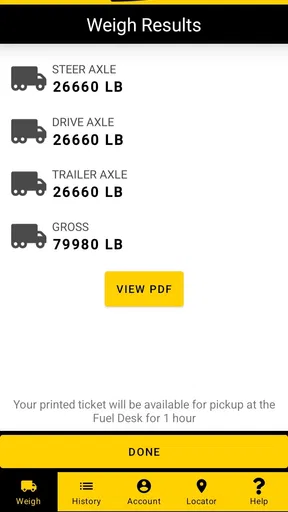
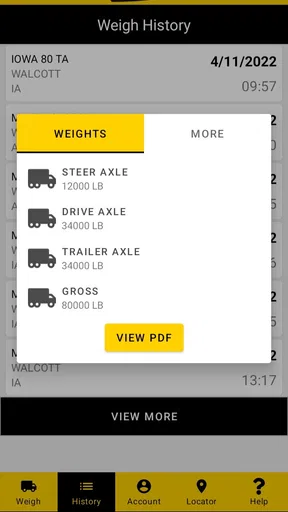
The app's strongest benefit is the reduction in unnecessary movement. A driver who has already spent hours on the road may not want to leave the cab, walk through a busy truck stop, and repeat the process at the counter. Receiving the weights on the phone makes it easier to review the result immediately. I can check whether the numbers look reasonable before pulling away, which is especially useful when the load has recently changed or the trailer was repositioned.
Payment is part of the app's purpose, but I would still treat the process as something to confirm carefully rather than tap through automatically. The convenience is valuable only when the correct truck, scale, and transaction are selected. A rushed tap at the wrong moment can create more friction than walking inside would have. I recommend completing the payment steps only after the vehicle is stationary and the scale position is correct.
For a realistic everyday example, imagine a driver hauling a mixed load late in the afternoon. The trailer was loaded at two locations, and the driver is unsure whether the distribution is comfortable across the axles. At a CAT Scale, the driver pulls on, uses the phone to pay, reviews the returned weights, and decides whether the load needs adjustment before continuing. The app does not make the loading decision for the driver, but it shortens the path from “I need to check” to “I have the figures in front of me.” That is where it earns its place.
What I would prepare before arriving
I would not wait until the truck is blocking the scale to discover that the phone is locked, the battery is low, or the connection is unreliable. The app depends on a working phone transaction, so basic preparation matters more here than it might in a casual app. I keep the device charged, make sure I can unlock it quickly, and avoid opening unrelated apps that could make the process slower.
I also recommend checking the surroundings before starting. Truck stops can be noisy and crowded, and a driver may be tempted to focus on the screen instead of the lane. The safest workflow is physical positioning first, digital transaction second. That order sounds obvious, but it is one of the most useful habits for making the app feel dependable rather than stressful.
Another practical habit is to review the returned weights before leaving the platform. Do not assume that completing payment means the job is finished. I look at the result, compare it with what I expected from the load, and make sure I have enough time to react if something seems wrong. A phone-based result is convenient, but the responsibility for interpreting the numbers remains with the driver.
Settings and phone habits worth checking
Weigh My Truck is deliberately narrow, so I would not expect a large collection of settings like those found in a navigation suite. The useful preparation is mostly around the phone itself and the way I use the app. I keep notifications from unrelated apps from covering the screen during a transaction, and I make sure the display does not go dark while I am reading the result. These are simple device habits, but they reduce avoidable interruptions.
It is also worth checking that the phone is running a compatible Android version. The minimum requirement is Android 7.0, which makes the app accessible on many older work phones. Still, compatibility alone does not guarantee a smooth experience on every device. Older hardware may switch between apps slowly, and a driver using a heavily managed company phone may face restrictions that have nothing to do with the app itself.
I would also think about connectivity before relying on the app as the only transaction method. A phone can show full signal one minute and struggle the next, especially around large metal structures, crowded truck stops, or rural stretches. I would not begin a scale stop assuming that every network condition will be perfect. Keeping an alternative plan, such as knowing where the counter is located, is sensible professional preparation rather than a criticism of this particular app.
For iPhone users, the situation deserves a quick check before planning a trip around the app. The product is presented as a mobile tool for weighing and payment, but the Android details are the ones clearly established here. I would verify the current availability and device requirements in the relevant app marketplace before depending on it on an iPhone. That takes a moment and avoids discovering a platform issue when the truck is already on the scale.
Privacy and payment awareness are worth keeping in the routine as well. I only enter payment information on my own device when I am ready to complete the transaction, and I avoid handing an unlocked phone to anyone else. The app's value comes from keeping the process in the cab, so maintaining control of the device is part of using it well.
Faster patterns that experienced drivers can build
The quickest users will not necessarily tap faster. They will remove decisions from the moment when the truck is on the platform. I would save the app in an obvious place on the home screen, keep the phone mounted or positioned where it can be reached safely, and use the same sequence every time: arrive, position, stop, open, pay, review. A repeatable pattern is more reliable than trying to remember a different approach at every location.
I would also separate navigation from weighing. Before entering the truck stop, I use my usual route-planning method to understand the entrance and exit. Once I reach the scale, I stop treating the phone as a map and use it only for the weighing task. This reduces screen switching and makes it less likely that I will accidentally leave the transaction or become distracted by route changes.
Another useful pattern is to make the first weigh a deliberate check rather than a rushed formality. If I know a load may be close to an axle limit, I plan enough time for the possibility of repositioning freight. The app makes obtaining the figures easier, but it cannot create time for corrections. Drivers who schedule the stop as part of the loading workflow will get more value from it than drivers who treat weighing as an afterthought.
For repeated routes, I would pair the app with a personal checklist. That checklist might include the preferred CAT Scale location, the safest approach, the point at which I want to check the load, and the action I will take if the weights are not what I expected. None of this requires a hidden feature inside the app. The advantage comes from combining a focused tool with a consistent driving habit.
There is also a useful trade-off between convenience and verification. Paying from the cab is faster, but walking inside can sometimes provide a human answer when a transaction behaves unexpectedly. My faster pattern is therefore conditional: use the app when the setup is normal, the phone is ready, and the scale interaction is clear; use the staffed option when something does not look right. Speed is helpful, but not at the expense of a correct weighing record.
Where the app reaches its limits
The biggest limitation is its narrow scope. This is not a complete navigation platform, a load-planning system, or a replacement for professional judgment. It helps with a CAT Scale transaction, but it does not turn a general trip into a fully managed workflow. Drivers who want route restrictions, fuel planning, traffic conditions, parking information, or detailed truck-specific navigation will need other tools.
That narrow design can be a strength if I judge it fairly. A general navigation app may be better for finding a route, but it usually does not focus on the exact moment of paying for a truck weighing and receiving the result. Conversely, a staffed scale-house interaction may be better when I need assistance, clarification, or a fallback during a phone problem. Weigh My Truck sits between those options: more convenient than a counter for a routine stop, but less flexible when the routine breaks.
I would also skip it if I rarely use CAT Scales. Installing a specialized app has little benefit when my regular routes do not take me to the relevant facilities. In that case, a broader navigation solution and whatever weighing process is available locally may be more practical. The app is best for drivers whose work repeatedly brings them to CAT Scale locations and who value staying in the cab.
New drivers should not mistake the phone result for a substitute for learning axle placement and load distribution. The app can provide the figures, but it cannot tell me whether a trailer is loaded safely in every circumstance. I still need to understand the vehicle, the cargo, the applicable limits, and the meaning of the numbers. The most responsible use is to treat the app as an information and payment shortcut, not as an automatic compliance decision.
There can also be friction when a driver changes phones, uses an older device, or works with a company-managed handset. The Android requirement is modest, but a compatible operating system does not solve every practical issue. Screen size, battery condition, connectivity, and access to payment details all affect the experience. I would test the workflow during a normal stop before making it central to a demanding route.
Who will get the most value from it
I think the best audience is the owner-operator or fleet driver who regularly weighs at CAT Scale locations and wants a repeatable cab-based process. The app is especially appealing when time outside the truck matters, when the driver already knows how to position the vehicle, and when the same weighing routine appears throughout the week.
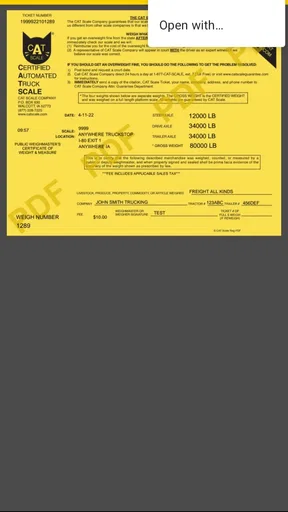
It can also help drivers who prefer a digital record on the phone rather than relying entirely on a paper exchange at the counter. The important point is not that digital is always superior; it is that having the result arrive through the same device used for the transaction can make review easier. I still recommend keeping whatever documentation the job requires and following company procedures.
I would be more cautious recommending it to occasional truck renters, passengers handling a one-time move, or drivers who do not visit CAT Scale locations. They may find a staffed facility simpler because there is less to learn for a single use. Likewise, anyone uncomfortable with mobile payment should not feel pressured to use the app merely because it is free.
The app's broad Everyone rating makes it approachable from an age-classification standpoint, but its real audience is defined by the work situation, not by the rating label. It is a professional utility for a specific task. Someone can install it easily and still gain nothing if that task is not part of their driving routine.
My verdict after looking at the complete workflow
With an average rating of 3.7 from around 2.9 thousand ratings and over 500 thousand installs, the app has a meaningful user base without presenting itself as a universal solution. I read those figures as a sign of a useful but specialized tool: drivers who need the CAT Scale workflow may appreciate it, while people expecting a full navigation experience may judge it against the wrong standard.
My recommendation is straightforward. If I were regularly weighing a truck at CAT Scale locations, I would keep Weigh My Truck installed because it removes walking and waiting from a routine task. I would prepare the phone before arriving, use a fixed sequence, review the result while still positioned safely, and keep a counter-based fallback for unusual situations.
I would not make it my only driving app, and I would not rely on it to solve load distribution or route planning. Its value is more precise than that. It turns the payment-and-results part of a scale stop into a phone workflow, while the driver remains responsible for the truck, the load, and the decision to continue.
That balance is why I find it useful. Weigh My Truck is at its best when treated as a focused shortcut, not a complete trucking assistant. For the right driver, that focus is exactly what makes the app worth using. For everyone else, the usual navigation app or a staffed scale process may be the better fit.
Verdict
Strengths of Weigh My Truck
- Quick weight lookup at participating CAT Scale locations.
- Displays certified axle and gross weights clearly.
- Helps spot overweight issues before reaching inspection points.
- Useful for planning loads and making safer adjustments.
- Simple interface designed for drivers on the road.
Limitations of Weigh My Truck
- Availability depends on nearby participating CAT Scale locations.
- Some features may require an internet connection.
- Results are only as current as the latest scale measurement.
- Not a substitute for official documentation or legal advice.
- The app may be less useful for occasional personal drivers.
Similar Picks in This Category
View All
Uber - Request a ride
Uber Technologies, Inc.4.7


inDrive. Rides with fair fares
® SUOL INNOVATIONS LTD4.8

Yandex Go: Taxi Food Delivery
Mikromobilnost LLC Belgrade4.8

Bolt: Request a Ride
Bolt Technology4.8

Rapido: Bike-Taxi, Auto & Cabs
Rapido Bike Taxi4.8
Frequently Asked Questions
What is Weigh My Truck and who is it designed for?
Weigh My Truck is a mobile service designed primarily for professional truck drivers and carriers who need to manage certified truck-scale transactions. It allows eligible users to find participating CAT Scale locations, initiate a weighing transaction, receive weight information, and handle payment through the app. It is most useful for drivers who regularly use supported scales and want a faster alternative to completing the process at the fuel desk.
How does the weighing process work with Weigh My Truck?
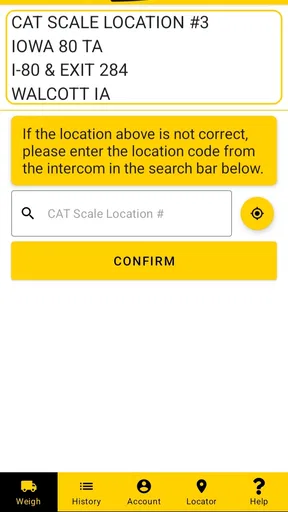
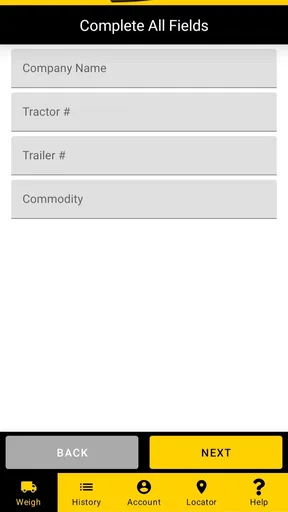
After opening the app, you generally select or confirm a participating CAT Scale location, enter the required truck and transaction details, and follow the instructions shown on screen. The app communicates with the scale system so the weighing process can be completed without leaving the cab in many situations. Once the transaction is finished, the app displays the weight information and provides access to the corresponding weigh ticket, depending on the location and service availability.
Can anyone use Weigh My Truck, and what do I need before downloading it?
The app is intended for users weighing vehicles at participating CAT Scale locations, so availability depends on the scale and the type of transaction you need to complete. Before using it, you should have a compatible Android or iOS device, an active internet connection, accurate vehicle information, and a valid payment method if the transaction requires payment. You may also need to create an account and verify your details.
Does Weigh My Truck provide official or certified weight tickets?
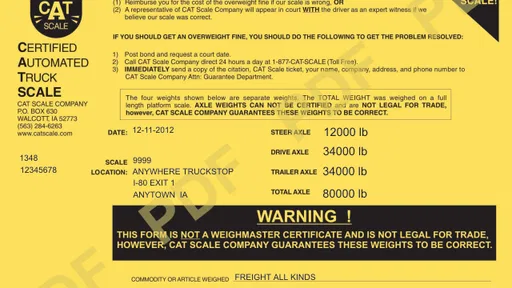
Weigh My Truck is connected with participating CAT Scale services and is designed to provide the weight information and ticket associated with a completed scale transaction. However, the exact format, availability, and acceptance of a ticket can vary by location and by the requirements of your carrier, shipper, or regulatory authority. Drivers should review the digital ticket carefully and confirm that it contains the information required for their records.
Is Weigh My Truck free to download, and are there additional costs?
The Weigh My Truck app may be free to download, but downloading the application does not necessarily mean that weighing services are free. Scale transactions normally involve a fee, and the amount can depend on the participating location and the service selected. Mobile data charges may also apply if you are not connected to Wi-Fi. Check the payment screen and the current terms before confirming a transaction.
